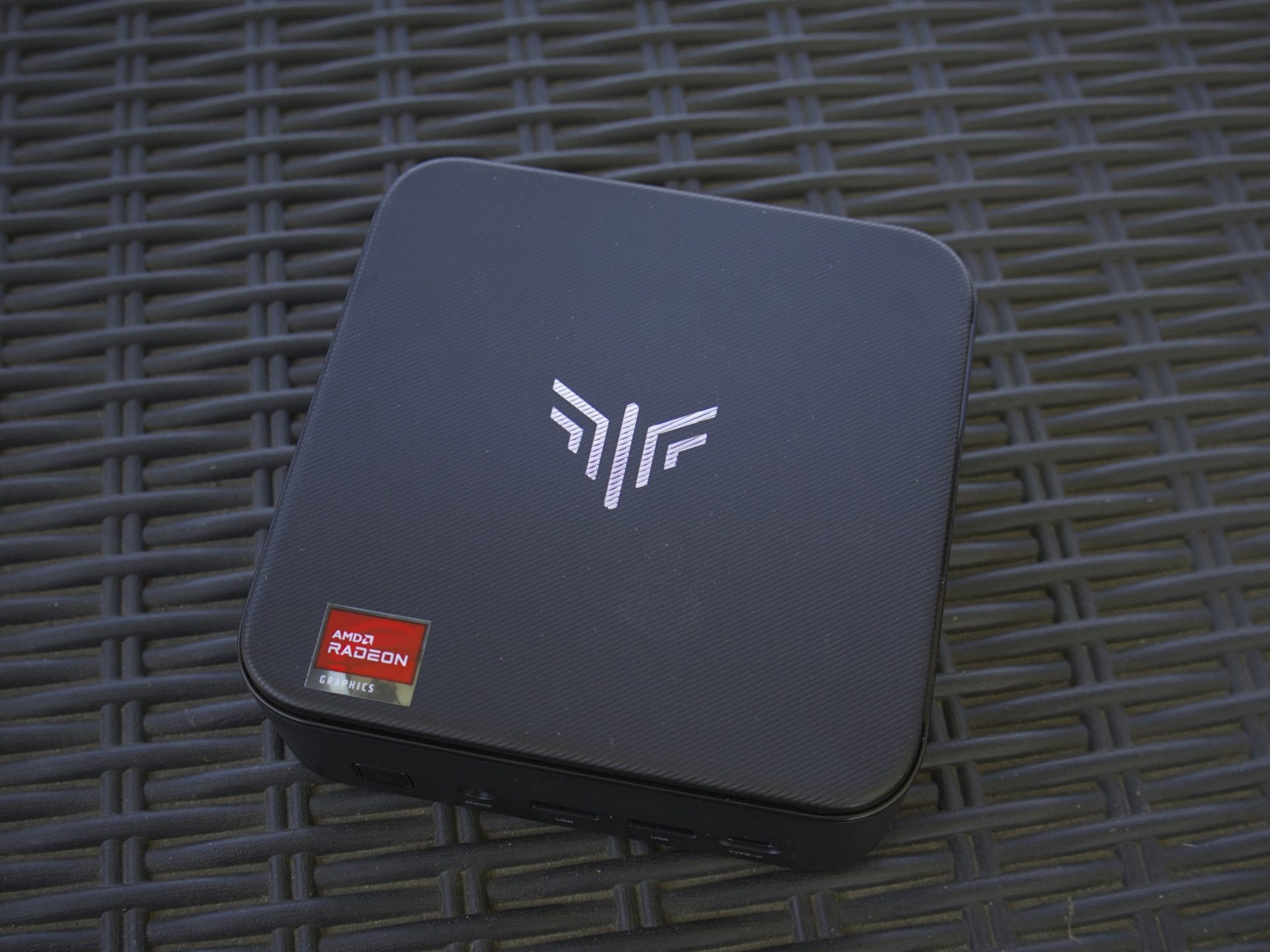
For the longest time I’ve had an old desktop running as a Plex Media Server and I’ve always meant to swap it out with something more efficient. The shortages, RAM, storage, PC prices, and everything else just kept climbing in cost and nothing ever really made sense. I’ve actually been after a Mini PC for a while — the Geekom, AceMagic, and Beelink varieties have always caught my eye. They’re also an incredible value, especially right now. Which brings us full circle to the Kamrui Pinova Series E3B Mini PC. This thing looks the part, it has some damn good hardware packed inside and it makes for one hell of a media server. But we’re also getting ahead of ourselves here.
The Kamrui E3B is a powerful mini PC — the brand has a great selection of models — available at a decent price normally, $489. It’s even better if you can find it on sale. And it has been discounted several times during my review period. The thing to note here is, while I’ve opted to employ it as a media server, it can be used for virtually anything from gaming, web browsing, even as a set top box connected to your living room TV. You better believe I put it through its paces. I did quite a bit of testing to see what else it could achieve. If you’re interested in this model, in particular, or something else similar you’ll definitely want to hear how things panned out.
If you haven’t already, grab a drink and a snack and let’s unpack this little wonder.
The full specifications are wild

 Source: Briley Kenney / Techigar
I’m about to drop some tech jargon, technical specs, and a whole lot of nonsense if you’re not a PC person, but trust me, it’s worth it. I’ll break it all down in layman’s terms, after.
The model I have is rocking an AMD Ryzen V2748 “Zen 2” with AMD Radeon graphics, a base clock of 2.9GHZ and a turbo boost up to 4.3GHZ. There are 8 cores, 16 threads, with a 16M cache. The embedded AMD Radeon graphics has 7 GPU cores and a 1600MHz clock speed (1.6GHz).
In addition, it has 16GB of dual channel DDR4 RAM at 3200MHz, and it’s expandable up to 64GB total. It comes with a 512GB M.2 2280 solid-state drive and its expandable up to 4TB total across two M.2 2280 slots — you’d install two 2TB SSDs to get that capacity. It also has Wi-Fi 6 and Bluetooth 5.2 but I have it connected to wired Gigabit LAN. The Wi-Fi does work great and supports up to 2400Mbps if you have a Wi-Fi 6-enabled router.
Kamrui E3B Mini PC Geekbench CPU Scores | Kamrui E3B Mini PC Geekbench GPU Scores
Peripherals, ports and connectors
 Source: Briley Kenney / Techigar
 Source: Briley Kenney / Techigar
 Source: Briley Kenney / Techigar
The inputs and outputs are also numerous. On the rear it has four USB 3.2 Gen1 Type-A ports (5Gbps), a Gigabit RJ45 (Ethernet), a 1.4b DisplayPort supporting 4K at 60Hz, an HDMI 2.0 at 4K and 60Hz, and DC power, it does come with the power adapter, as well. On the front, you have two USB 3.2 Gen2 Type-A (10Gbps), a USB 3.2 Gen2 Type-C (with DisplayPort 1.4, 10Gbps, and PD output), and a 3.5mm audio jack. Of course, the front also has a power button.
Plugged in, I currently have two external drives with my movies and shows stored separately, a wireless mouse, a mechanical keyboard, a display, and wired LAN. That still leaves me four USB Type-A, two rear and two front, as well as a USB Type-C on the front. Most smaller devices like this limit the amount of USB devices and peripherals you can have connected. The E3B Mini PC obliterates that concern. I could also fully expand the internal storage and RAM, as noted. Meaning, it has an epic amount of modularity and upgradeability.
Ultra-portable, extra portable, portable as hell
 Source: Briley Kenney / Techigar
 Source: Briley Kenney / Techigar
 Source: Briley Kenney / Techigar
The dimensions are about 5-inches by 5-inches by 1.62-inches (128mm by 128mm by 41.3mm) and it weighs only 1.1 pounds. It’s definitely small enough and lightweight enough to throw in a backpack, handbag or small satchel. Best of all, it runs ridiculously silent and cool even under some pretty heavy multi-tasking. That’s thanks to intelligently designed thermals. Kamrui calls it a high-efficiency triple-cooling system. It utilizes a high thermal conductivity aluminum sheet, enhanced heat dissipation and is equipped with a 2000RPM fan, but even under heavy loads the fan outputs about 30 decibels of noise, usually it’s much lower and near silent.
You can be doing some light gaming, watching 4K video, or even transcoding streaming content, all pretty hefty tasks, and the E3B remains cool to the touch and relatively quiet. Seriously, if you brought this thing to a coffee shop or a quiet office space with a display, you’d have absolutely no problems whatsoever. You’d be making more noise with your typing and mouse movements than the PC itself.
The power adapter isn’t too bulky either. It all makes for an incredibly portable experience, if that’s what you want. I could easily take this back and forth between my office and my back patio to work, browse, or play outside. It’s definitely more powerful and more capable than my laptop.
How’s the gaming performance?
 Source: Briley Kenney / Techigar
 Source: Briley Kenney / Techigar
 Source: Briley Kenney / Techigar
Don’t expect to run Cyberpunk at max settings on this thing, unless you’re streaming from another beefy PC. But light games run fine. It comes with a genuine copy of Windows 11 so you can install Steam and play natively. It offers a shit ton of potential for retro gaming or emulation and thanks to all the USB ports you can definitely hook it up in a game room or living room to get some co-op play sessions in.
I almost want to grab another one of these and use it to mod my Arcade1Up cabinets or to build out a pinball machine. Both are projects I’ve had on my to-do list for a while. This Kamrui E3B Mini PC would be perfect for those.
Some titles I’ve played natively include Balatro, Dave the Diver, Erenshor, Pathfinder: Wrath of the Righteous, Rogue Trader, Slay the Spire, and a few older titles like the classic Prince of Persia games. I obviously connected a controller for some of these and used a mouse and keyboard for others. I’ve been using the Gamesir Tegeneria Lite and I love it. I also streamed — from my main PC — Cyberpunk 2077, Baldur’s Gate 3, Forza Horizon 4, The Elder Scrolls IV Oblivion Remake, and Clair Obscur Expedition 33. The E3B Mini PC worked great in both instances. I’m not a frame-rate stickler but it was above 30 FPS for the native titles.
How’s the multi-tasking performance?
 Source: Briley Kenney / Techigar
 Source: Briley Kenney / Techigar
 Source: Briley Kenney / Techigar
To be clear, we’re talking about productivity apps, browsing, and maybe some light media all at the same time. Like watching YouTube in the background or listening to some music while you work, for instance. The Kamrui E3B handles some hardware-intensive tasks very well, including large, sprawling spreadsheets and documents. I’m a writer by trade, and a writer in my free time, so trust me when I say I have some ridiculously large work-suite documents. I have more than one manuscript that takes a while to load even on a beefy desktop. The Kamrui handles it all well. Moreover, you can plug into three displays simultaneously at 4K and 60Hz. It works but I just use my Aura Triple Boost 14 Pro — which has three displays built-in.
I have also spent time working from this device with apps or browsers running in the background. There can be a slowdown here or there, mostly when it comes to loading a new browser tab but nothing too frustrating. It handles a hefty load of tasks swimmingly and, with 16GB of RAM, everything is pretty speedy. If you find it’s not enough, you can always upgrade the RAM at any time which is fantastic.
To give you an idea of what I had running: I had Amazon Music in a Brave browser window, Google Docs in a Firefox window, work sites in another Brave tab, Plex Media Server running in the background, and Sonarr, a download client, and Tautulli (for Plex usage monitoring) also running. I had no slowdowns or hiccups. Those using my Plex server at the time didn’t report any issues either.
How’s the media server performance?
 Source: Briley Kenney / Techigar
 Source: Briley Kenney / Techigar
 Source: Briley Kenney / Techigar
My old desktop handled everything no problem while running as a media server. I’ve since uninstalled Windows and loaded Zorin OS on it, and it’s back to being a speedy little stunner. But that’s a full-fledged desktop which means it uses a lot of power. The Kamrui, by comparison, is much better and I can accurately report my power bill has gone down noticeably even with this mini PC running 24/7 as a media server on a side table in my office.
As for the experience, it works reliably. Transcoding works great, I’ve yet to see any slowdowns and I have multiple people using the server at any given time. In the evenings when traffic tends to pick up I would see a bit of slowdown or buffering every now and then on my end with my old desktop. That’s no longer the case. I also love that I can keep my media on external drives, plugged in via USB, and it handles everything just fine. I do have wake on LAN configured and the mini PC is connected wired via Gigabit Ethernet — once again for the people in the back.
Security checks
Seeing as the OS came pre-installed and this system could very well come from an untrusted and unknown source, I did the best I could to vet the background processes and scan the file directories. I’m no security researcher or cybersecurity expert, so take this information with a grain of salt. But I cycled through the running processes including looking at the detailed information in task manager. I also ran several malware and virus tools, including Malwarebytes, Emsisoft Emergency Scanner Toolkit and a few others. They discovered nothing suspicious.
I also have not encountered anything suspicious during my review period related to my signed-in accounts.
How do you upgrade the SSD or RAM?
While they are different models in the videos, you upgrade the Kamrui E3B’s RAM or SSD in the same way. You remove the rubber legs on the bottom and at the four corners revealing case screws. Unscrew those, pull apart the case and then you can access the interior.
I did loosen and pull apart my unit to see how easy it would be and whether or not I’d crack the shell or have any difficulties. I’m happy to report it was ridiculously simple once I got those damn rubber legs off.
What’s the verdict, and the price?


This Mini PC complements a full system well. If you have a main desktop, a laptop you use for work or play, or some other gadgets — like a tablet or phone — this is an absolutely solid alternative to throw in your lineup. You can use it as a media server, like I have, as a living room set top box to browse or watch media on your main TV, as a retro emulation machine, to augment other projects, as a portable PC to lug around between workspots and much, much more.
But even as I have handwaved it as a great backup device it’s also just a really, really solid PC option for those who want something capable, portable, and modular. It’s also a hell of a lot cheaper than most pre-builds you can buy on the market these days. If you’re not looking for a maximum performance gaming PC then it’s a much more affordable and accessible option there, too.
The hardware is more than capable, impressive actually. It has a near endless upgrade potential, which is not at all common for smaller devices like this. If you need more RAM you can upgrade the RAM. If you need more storage you can upgrade the SSD. There are tons of ports for extra peripherals, extra drives, extra applications, way more than you should ever expect to see in a device this size. Moreover, it comes pre-loaded with a genuine copy of Windows 11 which was definitely a welcome surprise. You could, of course, install whatever you want on here, including Linux or Steam OS to create a mini Steam PC.
Final thoughts
It’s solid for multi-tasking and productivity, it offers decent performance for light gaming or streaming, works well for media playback natively and media server applications, and I’m sure I’m barely scratching the surface in terms of what it can do. It comes with a VESA mount so you can install it to the back of a monitor if you want and it’s small enough, and light enough, to toss into a bag. So, as long as you have a portable display, you could bring it with you anywhere and instantly have a full-fledged PC, even in a coffee shop or library. It’s ultra-quiet and runs cool, too, especially under heavy loads.
Look, now I’m just rehashing and resummarizing the entire review. However, this is one hell of a mini PC and I absolutely stand by the experience it offers. I’m looking to get another already. With the shortages, cost increases, and potential to be PC-less in an emergency, it’s great to have one of these handy, at the very least.
$489 at full price is a small price to pay for the hardware it offers, flexibility, and sheer upgradeability. That’s the full price though, I’ve seen it on sale for much less — $339 at one point. It would be an absolute steal at that price.